

Introduction
Basic computer knowledge is essential in today’s digital world. Almost every job, business, and daily task involves computers in some form. Whether you are a student, office worker, or business owner, having basic computer knowledge helps you work faster and smarter.
In simple terms, basic computer knowledge means understanding how a computer works, what its main parts are, and how to use them effectively. It includes learning about hardware, software, operating systems, and common applications like Word, Excel, and internet browsing.
This guide will help you understand basic computer knowledge in an easy and practical way. You will learn step-by-step concepts, benefits, mistakes to avoid, and expert tips. By the end, you will feel confident using a computer for daily tasks.
What is Basic Computer Knowledge?
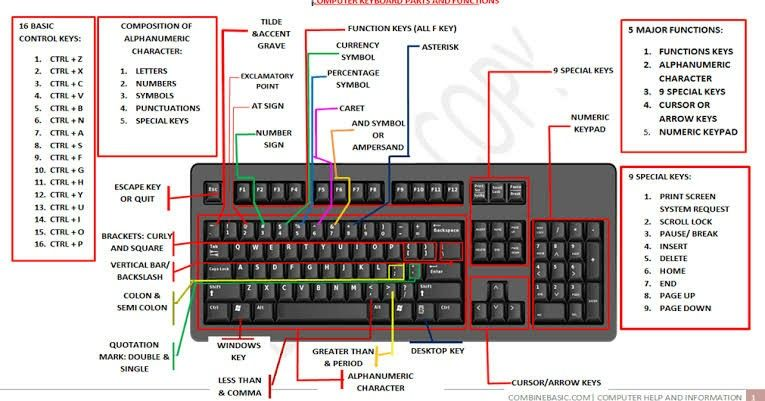
Basic computer knowledge refers to the fundamental understanding of computers and their operations. It includes knowing how to turn a computer on and off, use a keyboard and mouse, and run simple programs.
It also includes understanding hardware parts like CPU, monitor, keyboard, and mouse, as well as software like Windows and applications. With basic computer knowledge, you can perform everyday tasks such as typing documents, browsing the internet, sending emails, and managing files.
Why is Basic Computer Knowledge Important?
Basic computer knowledge is important because computers are used in almost every field today. From education to healthcare, banking to communication, everything depends on computers.
Without basic computer knowledge, it becomes difficult to compete in the modern job market. Employers expect workers to know how to use computers efficiently. Even students need these skills for assignments and online learning.
Detailed Step-by-Step Guide
Understanding Computer Hardware
Computer hardware refers to the physical parts of a computer. These include CPU, monitor, keyboard, mouse, and printer. Each part has a specific function. The CPU is the brain of the computer, while the monitor displays information.
To understand better, imagine a school computer lab. Every machine has a screen, a keyboard, and a CPU box. These components work together to perform tasks. Without hardware, a computer cannot function.
Learning Computer Software
Software is the invisible part of a computer that makes it functional. Without software, hardware cannot perform any task. System software like Windows or Linux controls the entire system, while application software like MS Word or Excel helps users perform specific tasks.
Modern software also includes mobile apps and web-based tools. These programs are designed to make work easier and faster. Regular updates improve security and performance, so keeping software updated is also part of basic computer knowledge.
Using the Operating System
The operating system acts as a bridge between users and computer hardware. It manages memory, processes, and files. Windows is widely used because of its simple interface and user-friendly design.
When you open a file, the operating system locates it and displays it on your screen. It also allows multitasking, meaning you can run multiple programs at the same time. Understanding OS basics helps users troubleshoot common issues.
Basic Internet Usage
The internet connects millions of computers worldwide. It allows users to communicate, learn, and share information instantly. Basic internet knowledge includes using search engines, browsing websites, and sending emails.
However, internet safety is very important. Users should avoid unknown websites, use strong passwords, and be aware of online scams. Safe browsing habits protect personal information and prevent cyber threats.
File Management Skills
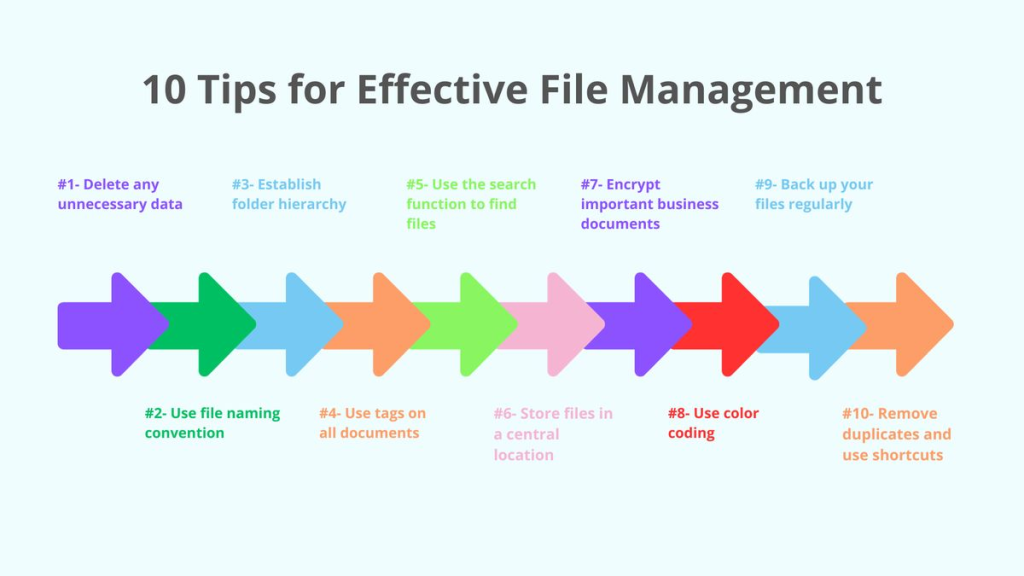
File management is an essential part of computer usage. It helps users organize data in a structured way. You can create folders, rename files, move documents, and delete unwanted data.
For example, students can create separate folders for different subjects. This makes it easier to find notes during exams. Proper file management saves time and improves productivity.
Benefits of Basic Computer Knowledge
- Improves job opportunities
- Helps in education and learning
- Increases productivity
- Makes communication easier
- Saves time in daily tasks
- Enhances digital skills
- Builds confidence in technology use
Disadvantages / Risks
- Overuse of computers can affect health such as eye strain
- Cybersecurity risks like hacking and phishing
- Dependence on technology for simple tasks
- Loss of manual and traditional skills
Common Mistakes to Avoid
- Ignoring basic typing skills and shortcuts
- Not organizing files properly
- Using weak or repeated passwords
- Clicking on suspicious links or emails
- Not updating software regularly
- Avoiding practice and hands-on learning
FAQs
What is basic computer knowledge in simple words?
Basic computer knowledge means understanding how to use a computer for everyday tasks like typing, browsing, and managing files. It also includes knowing basic parts of a computer and how they work together to perform tasks efficiently.
Why should students learn computer skills?
Students should learn computer skills because most educational systems are now digital. Assignments, exams, and research often require computer usage. It also prepares students for future jobs where digital literacy is essential.
Is computer knowledge necessary for office jobs?
Yes, almost all office jobs require basic computer knowledge. Employees must know how to use email, documents, spreadsheets, and presentation tools to perform daily tasks effectively.
How can beginners start learning computers?
Beginners can start by learning basic hardware parts, then move to software applications like Word and Excel. Practicing daily and using online tutorials helps improve skills quickly.
What are the most important computer skills?
The most important skills include typing, internet browsing, file management, and using office software. These skills are used in almost every professional environment.
Can basic computer knowledge improve career growth?
Yes, having computer skills improves career opportunities because employers prefer candidates who are digitally literate. It also helps in promotions and better job roles.
Expert Tips & Bonus Points
Practice regularly on a computer to build confidence
Learn keyboard shortcuts to save time
Use secure passwords for safety
Explore new software tools for learning
Take small daily practice tasks to improve speed
Conclusion
Basic computer knowledge is one of the most important skills in the modern world. It helps individuals perform tasks more efficiently and opens doors to better opportunities in education and employment.
From understanding hardware and software to using the internet and managing files, every aspect plays a vital role in daily life. With consistent practice and learning, anyone can develop strong computer skills.
In the future, digital systems will become even more advanced. Therefore, building a strong foundation in basic computer knowledge today will help you stay prepared for tomorrow. Start learning step by step, stay consistent, and grow your confidence in using technology effectively.
