

Introduction
The motherboard components are the backbone of every computer system, connecting all parts and allowing them to work together smoothly. Without understanding motherboard components, it becomes difficult to truly know how a computer functions. Whether you are building a PC, upgrading hardware, or simply learning computer basics, knowing motherboard components is essential for beginners and intermediate users.
A motherboard is like the central communication hub of a computer. Every device, from the processor to storage drives, connects through it. The motherboard components control how data flows between different hardware parts, ensuring everything runs efficiently. If one part fails or is not compatible, the entire system can be affected.
In this guide, you will learn all major motherboard components, their functions, and why they matter. We will also explore their benefits, common mistakes, and expert tips in simple English. By the end, you will have a clear understanding of motherboard components and how they shape your computer’s performance.
What is Motherboard Components?
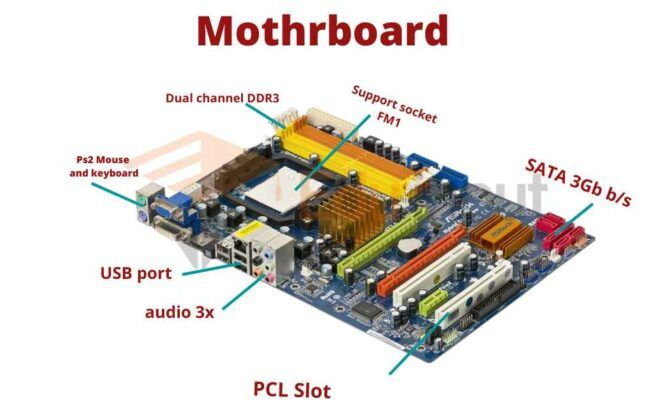
Motherboard components refer to all the physical parts and electronic elements installed on a motherboard that allow a computer to function. These components include the CPU socket, RAM slots, chipset, BIOS/UEFI chip, expansion slots, power connectors, and storage interfaces.
Each of these motherboard components plays a specific role in ensuring communication between hardware parts. For example, the CPU socket holds the processor, while RAM slots manage temporary memory. The chipset controls data flow between CPU, memory, and peripherals.
Without motherboard components, a computer would not be able to process instructions, store data, or display output. They act as a bridge between all internal devices. This makes motherboard components one of the most important parts of any computing system.
Why is Motherboard Components Important?
Motherboard components are important because they determine how well a computer performs and what hardware it can support. Every task you do on a computer depends on these components working together.
First, they ensure compatibility between different hardware parts. If the motherboard components do not support a specific processor or RAM type, the system will not work properly. This is why choosing the right motherboard is crucial.
Second, motherboard components affect system speed and efficiency. A high-quality chipset and faster bus system improve data transfer rates, resulting in better performance.
Third, they provide expansion options. Through slots and connectors, users can upgrade graphics cards, storage devices, and memory.
Finally, motherboard components ensure system stability. A well-designed motherboard reduces overheating, crashes, and hardware conflicts.
Detailed Step-by-Step Guide
Understanding the CPU Socket
The CPU socket is one of the most important motherboard components. It is the place where the processor is installed. Different sockets support different CPU types, so compatibility is very important.
Exploring RAM Slots
RAM slots are used to install memory modules. These motherboard components allow the system to handle multiple tasks at once. More RAM slots mean better upgrade options.
Learning About the Chipset
The chipset is the control center of the motherboard components. It manages communication between the CPU, memory, and input/output devices. A powerful chipset improves overall performance.
BIOS or UEFI Chip Function
The BIOS or UEFI chip is responsible for starting the computer. It checks all motherboard components during boot-up and loads the operating system.
Expansion Slots Explained
Expansion slots allow users to add extra hardware like graphics cards, sound cards, and network cards. These motherboard components improve system flexibility.
Power Connectors Role
Power connectors supply electricity to all motherboard components. Without stable power delivery, the system cannot function properly.
Storage Interfaces Overview

Storage interfaces like SATA and NVMe connect hard drives and SSDs. These motherboard components determine data transfer speed and storage performance.
Benefits of Motherboard Components
- Provide smooth communication between hardware parts
- Support system upgrades and expansion
- Improve overall computer performance
- Ensure stable power distribution
- Allow compatibility with different devices
- Help manage system resources efficiently
- Enable faster data transfer between components
Disadvantages / Risks
- Poor quality motherboard components can reduce system lifespan
- Compatibility issues may arise with new hardware
- Overheating can damage sensitive components
- Limited upgrade options in low-end motherboards
- Complex design may be difficult for beginners to understand
- Faulty components can cause system crashes
- High-end motherboards can be expensive
Common Mistakes to Avoid
One common mistake is ignoring compatibility when choosing motherboard components. Many users buy processors or RAM without checking if they match the motherboard.
Another mistake is improper installation. Incorrectly placing components like RAM or CPU can damage the motherboard.
Some users also forget about power supply requirements. Weak power delivery can harm motherboard components and reduce performance.
Dust accumulation is another issue. It can block airflow and cause overheating.
Finally, many beginners ignore BIOS updates, which are important for improving compatibility and performance.
FAQs
1. What are motherboard components in simple words?
Motherboard components are the parts on a motherboard that help a computer function. They connect CPU, memory, storage, and other devices together.
2. Why are motherboard components important?
They are important because they control communication between all hardware parts and ensure the computer runs smoothly.
3. Can I upgrade motherboard components?
Yes, some components like RAM, storage, and expansion cards can be upgraded depending on motherboard support.
4. What happens if motherboard components fail?
If they fail, the computer may not start or may crash frequently because hardware communication is disrupted.
5. Are all motherboard components the same?
No, different motherboards have different components and features depending on design and purpose.
6. How do I choose the right motherboard components?
You should check compatibility with CPU, RAM type, storage options, and expansion needs before choosing.
Expert Tips & Bonus Points
Always check compatibility before buying any motherboard components. This avoids performance issues and hardware damage.
Choose a motherboard with future upgrade options. This ensures your system stays useful for longer.
Keep your motherboard clean and dust-free to improve lifespan and cooling efficiency.
Use a high-quality power supply unit to protect sensitive motherboard components from voltage fluctuations.
Update BIOS regularly to improve system stability and support new hardware.
If you are building a gaming or high-performance PC, invest in a motherboard with better chipset and cooling support.
Conclusion
Understanding motherboard components is essential for anyone who wants to learn how computers work or build their own system. These components are responsible for connecting and controlling all major hardware parts, making them the foundation of every computer.
From the CPU socket to RAM slots, chipset, and expansion ports, each part plays a vital role in system performance. When motherboard components work properly, your computer runs smoothly, efficiently, and reliably.
For beginners, learning about motherboard components helps in making better decisions when buying or upgrading a PC. It also prevents common mistakes that can lead to hardware failure or performance issues.
In conclusion, motherboard components are not just technical parts; they are the heart of your computer system. By understanding them clearly, you can build, upgrade, and maintain a powerful and stable computer for years to come.
